Job Search, filters then AI Smart Filter
FluxResume Job Search is a split view: search bar and advanced filters on the left, job detail on the right, with an AI mode that writes the filters for you.

Job Search (/apps/jobs) is the finding surface: search bar and filters on the left, the selected job's detail on the right. Two buttons there do work beyond reading — Analyze Job Skills and the resume action. You still apply on the employer's own site, and nothing here records which board a job came from. Details: Job Search.
Product page for the same idea: https://fluxresume.io/job-portal-search/.
The search bar
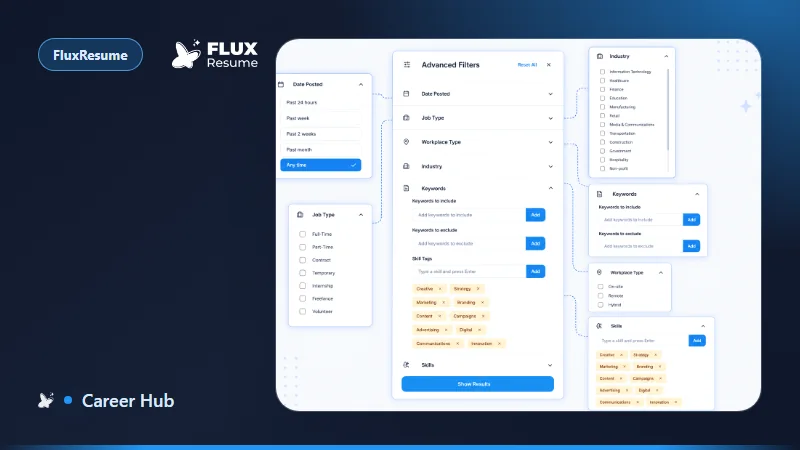
Free-text job title or company, a State dropdown, a City multi-select, and Filters, which opens the Advanced Filters panel with a badge for how many are active. Clear all only appears once something is applied — if you cannot see it, nothing is filtering your results.
Advanced Filters holds Date Posted (Past 24 hours, Past week, Past 2 weeks, Past month, Any time), Job Type, Workplace Type, Industry, Keywords, and Skills. Three buttons, and only two of them close the panel: Show Results applies and closes, the X closes without applying, and Reset All clears your selections and leaves you there.
AI Smart Filter hands the filters back
Click AI and the main input becomes an AI Smart Filter field. Type the requirement in plain language — the doc's example is "remote senior React roles in fintech" — then Enter or Apply AI. X returns to normal search.
What comes back is filters, not a separate result list: job titles, state, cities, date posted, job types, workplace types, industries, skills and keywords. They land as chips below the search bar ("Title: React Developer", "Skills: Python") and the list refreshes against them.
That is the part worth knowing. Because the output is chips, you can see what it decided and delete any single one. A natural-language search that silently reinterprets your query gives you nothing to argue with; this one shows its work. It is still only a filter generator — when results are off, the doc's advice is to rephrase or add detail, not to re-run the same sentence.
Cards, detail, tabs
The list panel shows a total match count above a scrollable set of cards, each with title, company, posted date and a bookmark icon, with Previous / Next pagination (30 per page in the documented view). Bookmarking puts the job on the board — see Pipeline and Job Tracker is a kanban, not a spreadsheet dump.
The detail panel carries the description, company, location, work mode, tech tags, and a salary range if one is available — take that qualifier literally. Apply Now opens the employer's own URL in a new tab; you apply on their site. Analyze Job Skills, on the Overview tab, highlights your matching skills inside the description, which is a cheaper check than generating a resume and reading the score afterwards.
The resume action sits in the same row. The two docs label it differently — Job Search calls it Create Resume, Job Based Resume calls it Job Based Resume — but the flow is one: the job is saved at Bookmarked if it was not already, a resume is generated for that role, the button disappears, and a Resume card appears linking into the editor. From there, Tailor a resume to one job description covers the match score and the Smart Match rewrite.
Trends charts skill demand for the job's technologies over the last 30 days, with a summary card per skill. The doc's example card reads "14 job openings, -71.4%" — that is one skill on one day, not a benchmark. Similar Companies lists other employers with comparable roles; Show more expands the category tags when a company has more than three.
Two things this page will not tell you
No FluxResume documentation states how many boards or sources feed this list, so no count appears here. If you see one attached to this feature, it did not come from the docs.
And a saved job records no source, so the product cannot tell you which site produced your replies — you write that in the job's Notes tab yourself. Which external boards are worth keeping alongside this one is a separate question.