Which job search tools actually integrate with LinkedIn and Indeed?
Sync usually means a browser extension that saves a listing or autofills a form, not a LinkedIn or Indeed API. FluxResume bookmarks from Job Search into Pipeline.

Most job search tools do not have a LinkedIn or Indeed API. Sync usually means a browser extension that saves a listing or autofills a form. FluxResume bookmarks from Job Search into Pipeline, then Apply Now opens the employer site. A save button that never opens the posting is not board integration.
- FluxResume Job Search bookmarks into Pipeline. Apply Now opens the employer site. You still set Applied yourself.
- Jobscan leftover: the known brand for JD keyword-scan reports. It does not save LinkedIn or Indeed jobs.
- Huntr leftover: a long-standing tracker UI and Pro reporting. The extension saves a listing. It does not submit through LinkedIn.
- Teal leftover: Teal+ brand recognition. The clipper saves a listing. It does not submit through LinkedIn.
- Careerflow leftover: a larger LinkedIn optimizer suite, not board-to-tracker sync.
- Simplify leftover: Copilot on a large ATS-form surface. You review and submit.
- Boards as sources are a different question: which job search websites are worth your time.
What job board integration actually means
Job board integration usually relies on a browser extension rather than a direct connection to LinkedIn or Indeed. The extension can read a listing, save its details, and fill application fields from a stored profile. Autofill tools commonly work across employer systems such as Workday, Greenhouse, and Lever by detecting form fields on the application page (Simular.ai).
Save-from-board and autofill are different jobs. Save-from-board captures title, employer, description, and URL for your tracker. Autofill enters contact details, work history, education, and saved answers after LinkedIn or Indeed sends you to an employer's form. A tool can do one without the other.
True API sync would let a third-party platform exchange application data with the board. Most tools do not have that. LinkedIn Easy Apply stays a LinkedIn-native flow. When a vendor says one-click apply, it usually means extension autofill, and you still review answers and click submit.
FluxResume
FluxResume is one workspace: find a role, tailor a resume, keep the card on the board. Apply Now opens the employer URL; you click submit.
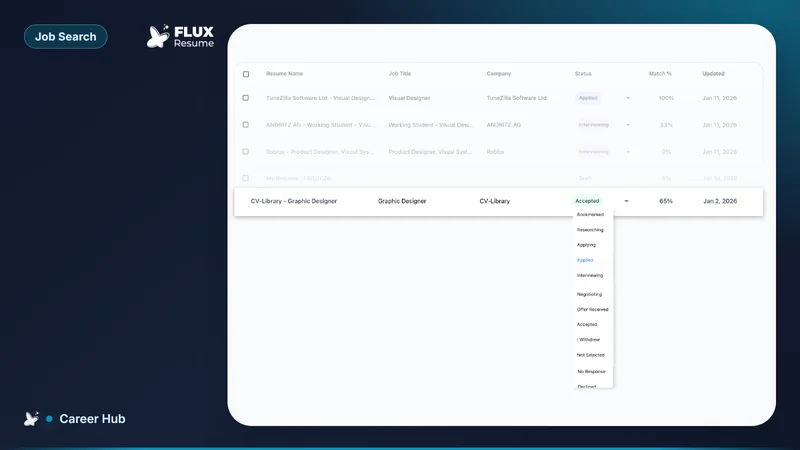
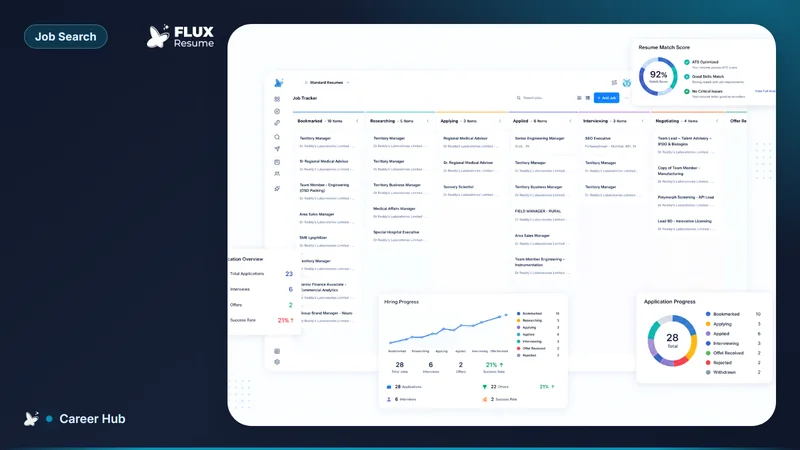
Job Search is a split view: search and filters on the left, the posting on the right. Bookmarking drops the job on Pipeline at Bookmarked. Apply Now opens the employer's own URL in a new tab. You apply there. You move the card to Applied yourself, with a date, the way what you do right after you apply describes.
That is in-app capture plus a tracker, not an API handshake with LinkedIn or Indeed. The product does not record which board produced the listing — if you care, write it in Notes, as which job search websites are worth your time already says. The screen walkthrough is Job Search, filters then AI Smart Filter. Product: https://fluxresume.io/job-search/.
Contacts you can name live in Contacts. Browser Extension is a contact source value. Chrome save/clip and Smart Auto Fill (US, opt-in) sit on the same $0 plan.
Jobscan
Jobscan leftover: the known brand for JD keyword-scan reports. It calculates a match score, flags missing skills, and checks whether an ATS can parse the format. Power Edit can rewrite bullets to include keywords more naturally.
Jobscan also reviews LinkedIn profiles against recruiter search patterns. That is not a live connection to LinkedIn's job board. It does not save LinkedIn or Indeed listings into a pipeline.
Published comparisons describe Jobscan as an optimization tool. Use FluxResume to tune a resume against a posting and keep the card on Pipeline. Compare: https://fluxresume.io/vs/jobscan/.
Huntr
Huntr leftover: a long-standing dedicated tracker UI and Huntr Pro reporting. Its browser extension saves listings from LinkedIn, Indeed, Glassdoor, and employer career pages into kanban boards.
Huntr Free caps tracking at 100 jobs (Huntr pricing, August 2026). Huntr Pro is $40/month ($90/3 months or $160/6 months) for unlimited tracking and AI. The extension saves job information. It does not create a LinkedIn or Indeed API. Compare: https://fluxresume.io/vs/huntr/.
Teal
Teal leftover: Teal+ brand recognition. The Chrome extension captures a LinkedIn listing's title, company, description, and URL, then adds the job to a pipeline.
Teal+ is $13/week, $29/30 days, or $79/90 days (Teal pricing, August 2026) for unlimited keywords and AI. The one-click action saves a listing. It does not submit through LinkedIn.
FluxResume vs Teal: https://fluxresume.io/vs/teal/.
Careerflow
Careerflow leftover: a larger LinkedIn optimizer suite. Breadth does not mean deep LinkedIn or Indeed application sync. Some capabilities sit behind add-ons.
FluxResume vs Careerflow: https://fluxresume.io/vs/careerflow/.
Simplify.jobs
Simplify leftover: Copilot on a large ATS-form surface. A third-party review found that its browser extension reduced a typical application taking 12 minutes to under two minutes by inserting stored profile details into employer forms (Simular.ai).
The extension can run when LinkedIn or Indeed sends you to an employer's application page. You still review and submit. FluxResume Smart Auto Fill is opt-in and sits with search, a resume, and Pipeline at $0. Compare: https://fluxresume.io/vs/simplify/.
What to use
Pick FluxResume when you want search, a tailored resume, and the same job card in one place. Career-changers can keep more than one resume version on different cards. High-volume applicants still apply on the employer site. The board is https://fluxresume.io/job-tracker/. The kanban itself is Job Tracker is a kanban, not a spreadsheet dump.
Leftovers only: Jobscan’s keyword-report brand, Huntr Pro reporting, Teal+ name recognition, Careerflow’s LinkedIn optimizer suite, Simplify Copilot on a large ATS-form surface.
Common questions
What is a job search organizer that syncs with LinkedIn?
A tracker that saves LinkedIn listings into a pipeline, usually through a browser extension, not a LinkedIn API. FluxResume bookmarks from Job Search or Add Job, then Apply Now opens the employer form.
What tracking software integrates with LinkedIn and Indeed?
Software that records the job after you save or apply from those boards. FluxResume records the job when you bookmark it or add it, then you set Applied on Pipeline.
Do one-click apply tools file through LinkedIn, or only autofill?
Most third-party one-click tools autofill the employer's form. They do not submit through LinkedIn Easy Apply. FluxResume Apply Now opens that form. You click submit.
Does FluxResume replace Huntr plus Jobscan plus Simplify?
Yes for the weekly workspace: search, resume, tracker, and opt-in autofill in one product. Leftovers if you still want a named niche: Jobscan’s keyword-report brand, Simplify Copilot on a large ATS-form surface, Huntr Pro reporting.