What does an organised job search look like day to day?
Three blocks a day — collect, apply, follow up — plus one weekly review of your own numbers. The routine that survives a week with no replies.

Three blocks a day. Collect roles in the morning without applying to any, research and apply in one focused block, send follow-ups last. Review your numbers weekly — the Dashboard Insights card counts applications, replies and interviews by weekday. No tool schedules those blocks for you, and none of it survives closing the tab before you record the application.
- Three blocks, in order: collect, apply, follow up. Applying inside the collect block is what turns a search into an all-day scroll.
- The application gets recorded before the tab closes. Batching updates to Friday loses roughly half of them, because you are reconstructing from memory.
- The weekly review needs four numbers: applications sent, replies received, interviews booked, and how many things are sitting in Applied with no answer.
- Anything in Applied with three weeks of silence gets closed out. Close Job is on the job detail status bar, not a board column.
- Set a daily application goal you can hit on a bad day. Career Goal Setup accepts 1 to 50, and the Application Streak counts consecutive days rather than volume.
- Two tools maximum. Six places to update is a system nobody maintains past week three.
How much of a day does this actually take?
Between ninety minutes and two hours, if you are searching full-time and tailoring what you send. What moves that range is not discipline — it is how much you rewrite per application. Sending the same file to forty postings takes twenty minutes a day; rewriting a summary and four bullets against each posting takes about fifteen minutes per application, and the arithmetic follows.
The condition that flips this: if you are searching while employed, you do not have ninety minutes on a weekday, and pretending otherwise is how people end up doing neither job properly. That search runs on four or five concentrated hours a week and a much shorter target list — see how to look for a job while you still have one, which is a different operating model rather than this one compressed.
Nobody needs an eight-hour day of open tabs. A search expands to fill the time it is given, and the hours past the second are mostly refreshing job boards.
The morning block: collect, do not apply
Twenty to thirty minutes, and the rule is that you do not apply to anything you find. You are building a queue, not working it.
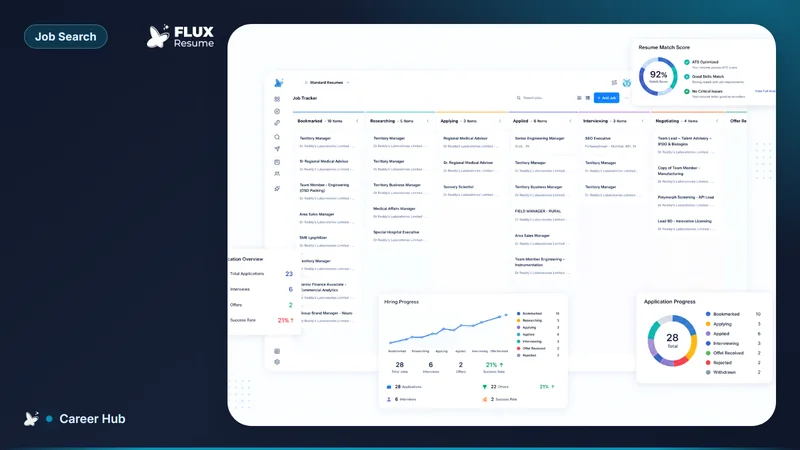
Run your saved searches, read enough of each posting to know whether it is real, and save the ones worth a second look. In FluxResume this is the bookmark icon in Job Search; bookmarked roles land in the tracker at Bookmarked, so the queue and the pipeline are the same object rather than two lists you reconcile later. Two or three sources is plenty — which job search websites are worth your time is the shortlist question, and more sources mainly produce more duplicates.
The no-applying rule exists because collecting is fast and comparative while applying is slow and singular. Interleave them and you spend forty minutes on the first decent posting you see and never read the other nine — which is how people apply to worse roles than the ones they found.
The apply block, start to finish
Sixty to ninety minutes, one sitting, and it has a shape: choose, research, tailor, submit, record.
Pull three or four roles out of Bookmarked and research them properly — what the company does, who you would report to, whether the posting is a real opening or a pipeline advert. Expect to discard one or two; that is the block working. A discard at the research stage costs six minutes, and the same discard after an interview costs a day of leave.
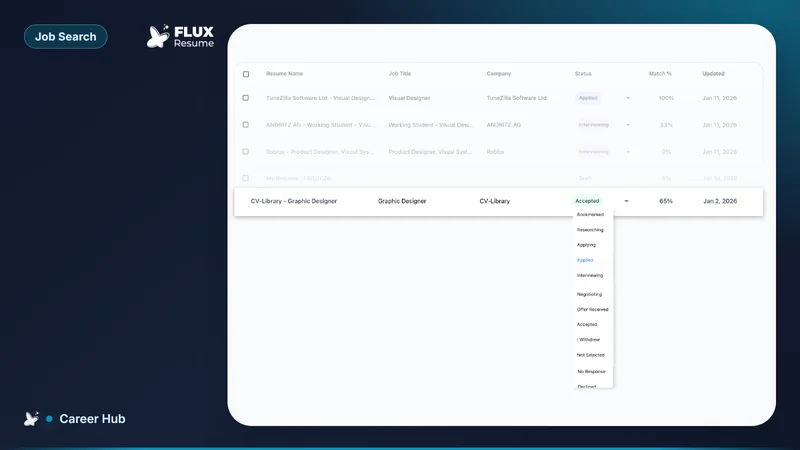
For the two you keep, tailor and submit. The match panel on the job card shows a match percent with direct, smart and missing keyword highlights in the description, which is the fastest read on whether your current resume is close or nowhere near. Then record it before the tab closes: stage to Applied, the resume you sent attached to the job, a follow-up date set by hand. That step is thirty seconds and it is the one everyone skips — what do you do right after you apply. How to track 20+ job applications without losing track covers what belongs in that record and what does not.
Follow-ups go last, in a short block before you stop for the evening, because they are the task most easily displaced by an interesting new posting. Once a role reaches the interview stage the follow-up changes shape completely — what do you send after an interview, and when covers that one.
What the weekly review should measure
Four numbers, once a week, about your own search: applications sent, replies received, interviews booked, and the count of applications sitting in Applied with no answer. Thirty minutes, same day each week.
The Dashboard has most of this. Insights is a weekly table of applications, replies and interviews per weekday; the Application Funnel shows counts for Bookmarked, Applied, Interviewing and Offer, and clicking a stage opens the tracker filtered to it. You are not looking for a grade — you are looking for the ratio that changed and whether the change followed something you did.
Then close things out. An application with three weeks of silence is not pending, it is finished, and leaving it in Applied means your funnel describes a search you are not running. Close Job sits on the job detail status bar in Pipeline. Keep the record, close the stage. If the reply rate itself is the problem, the causes are diagnosable — why you are not getting interview callbacks works through them in order.
Two things this review will not give you. There is no honest benchmark to compare your interview rate against; the figures circulating in job-search content are unsourced, and a rate that is fine for a senior specialist in a thin market would be alarming for a generalist in a deep one. Compare this week to your own last three. And FluxResume cannot tell you which job board is working for you: Insights breaks activity down by weekday, not by source, and there is no per-platform response report. To get that answer you write the source into each job's Notes tab and count by hand — worth doing for a month, not forever.
Why organisation systems collapse in week three
They collapse for three reasons, and none of them is laziness.
Too many places. Resumes in one app, tracking in a spreadsheet, pipeline in a kanban tool, notes somewhere else, reminders in a calendar. Each is a sync you perform by hand, and the first time you skip one the whole thing stops being trustworthy. Two is the ceiling.
Batching updates. "I will update everything on Friday" is a plan to spend thirty minutes reconstructing four days from your sent folder, and to get it wrong.
A goal set on a good day. Pick a daily target from your most energetic afternoon and you will miss it by Wednesday, at which point the streak breaks and the number becomes something you are failing rather than following. The Daily Goal in Career Goal Setup accepts anything from 1 to 50, the Action Items card works from it, and the Application Streak counts consecutive days — so three a day every day scores better than fifteen on Monday and nothing after. Set it low enough that a bad day still counts; raise it once the habit exists.
Which tool holds this together matters less than it being one tool you open daily. The FluxResume version starts at https://fluxresume.io/job-search/, and the tracker is the same object you bookmarked into.
Common questions
How many applications a week is realistic?
Nobody can give you a number that is true for your market, and the ones published without a source are guesses. The useful version of the question is how many you can tailor properly in the hours you have: at roughly fifteen minutes per application, two a day is a full search and ten a day is not happening. Set the Daily Goal to what a bad day supports.
Should I update the tracker daily or weekly?
Daily, and specifically before you close the tab you applied in. The information you need — the exact title, the resume you sent, the portal you used — is in front of you at that moment and gone an hour later. A weekly update session is really a weekly reconstruction session, and it silently drops the applications you half-remember, which are the ones most likely to reply.
Which numbers are worth tracking?
Applications sent, replies received, interviews booked, and the count stuck in Applied without an answer. Those four tell you whether the problem is volume, materials or targeting. Anything more granular is measurement for its own sake at the sample sizes one job search produces — twenty applications will not tell you which weekday is better to apply on, whatever the pattern looks like.
Where do I set a daily application goal?
On the Dashboard, in the Career Preferences card: click the pencil icon, scroll to Daily Goal, and use the minus and plus buttons to pick a number between 1 and 50. It saves per resume profile, so a contract-work profile and a full-time profile can carry different targets. The dashboard's Action Items card and your Application Streak both read from this number.
Originally published January 2026. Reviewed and rewritten for FluxResume in August 2026.